
Contact Follow‑Up Actions — Strike While the Lead Is Hot! 🔥

Timing is everything in sales. You spot a visitor engaging with your OneMob microsite—now what? With our new Contact Follow‑Up Actions, you can reach out instantly via email, phone, or LinkedIn, right when interest peaks.
What’s New?
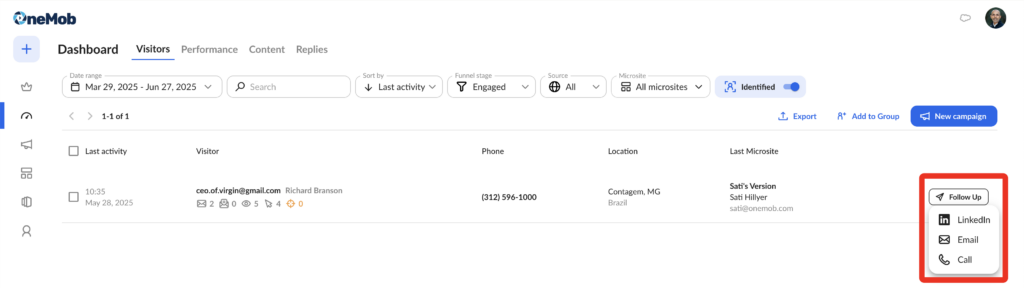
As soon as a visitor lands on your page or watches your video, you’ll see their details in your OneMob activity feed. From there, choose from three one‑click follow‑up options:
📧 Email – Send a personalized note without leaving the platform.
📞 Phone – Click‑to‑call directly from the browser (or mobile app).
🔗 LinkedIn – Open their profile to send an InMail or connection request.
Why It Matters
- Improved Response Rates: Leads are most receptive within minutes of engagement.
- Streamlined Workflow: No more context‑switching between apps.
- Personalized Touch: Reference their exact behavior (“I noticed you watched our demo…”).
How It Works
- Monitor Live Activity: Watch real‑time visitor events in your dashboard.
- Select the Visitor: Click on their name to open the contact card.
- Choose Your Action: Hit Email, Call, or LinkedIn. Pre‑populated templates help you craft the perfect message.
Use Case: The Hot Lead
Jane from Acme Corp watches your 2‑minute product overview. Immediately, you click “Call,” jump on a quick call, and book a full demo—all within five minutes of her initial engagement.
Tips for Success
- Have Templates Ready: Draft short, high‑impact scripts for each channel.
- Prioritize High‑Value Leads: Use scoring to flag key accounts.
- Follow Up Again: If your first attempt doesn’t connect, schedule a reminder in OneMob.
Ready to Light the Fuse?
Don’t let your hottest prospects cool off. Log into OneMob, enable Contact Follow‑Up Actions, and start converting real‑time engagement into closed deals—faster than ever before.


