Your preferences control the defaults for new microsites and which email notifications OneMob sends you when people engage with your content.
Open your preferences
- Click your profile icon in the top-right corner.
- Choose Account Settings.
- Open My Preferences.
Set your defaults
The General column sets the starting options for new microsites you share:
- Require Identification to View by Default: viewers enter their email before they can see the microsite, so you know who viewed it.
- Use Animated Thumbnail for Videos by Default: the shareable video thumbnail plays as a short animation, like a GIF.
Choose your email notifications
The Email Notifications column lists the activity OneMob can email you about:
- Email Opened: a recipient opened an email sent through OneMob. Some email clients block this signal.
- Microsite Viewed: someone opened your microsite.
- Video Watched: someone watched a video on your microsite.
- Image Viewed: someone clicked an image.
- Link Opened: someone clicked a link.
- Document Viewed: someone viewed a document, such as a PDF.
- Document Downloaded: someone downloaded a document.
- Microsite Button Click: someone clicked a custom button.
- Microsite Meeting Button Click: someone clicked a meeting button.
- Replies & Reactions: someone replied to or reacted on your microsite.
- Forwarded: someone forwarded your microsite.
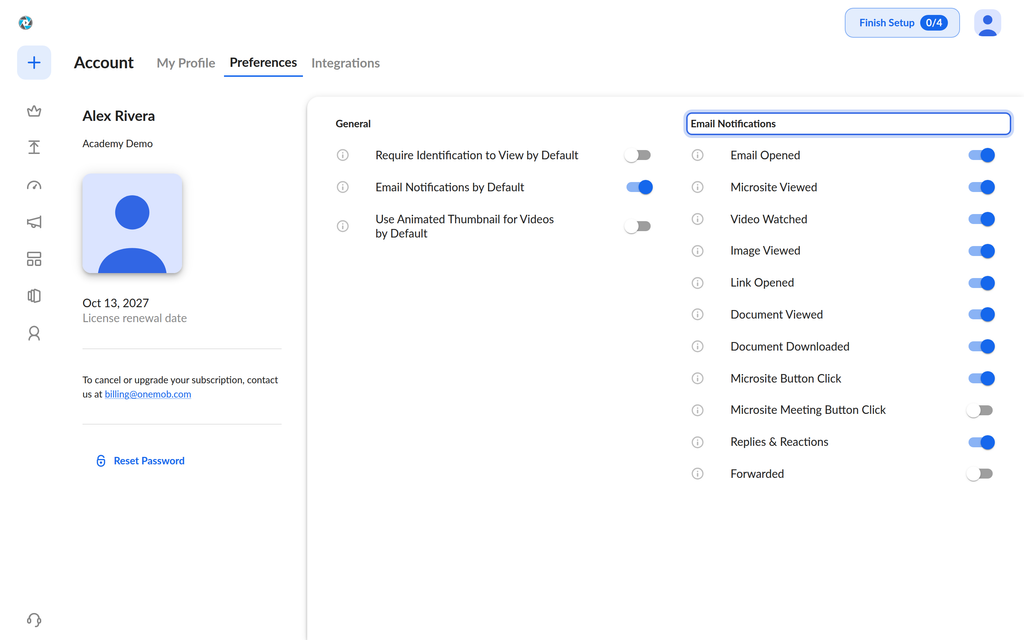
When you join OneMob, every email notification is turned on so you hear about all engagement from the start. To get fewer emails, turn off the toggles you do not need. Your choices are saved to your account.
Related articles
Was this helpful?